The N+1 Problem: What It Is, Why It Hurts, and How to Fix It
Every developer hits the N+1 query problem eventually. Here's a clear breakdown of what causes it, why it silently destroys performance, and the proven patterns to fix it.
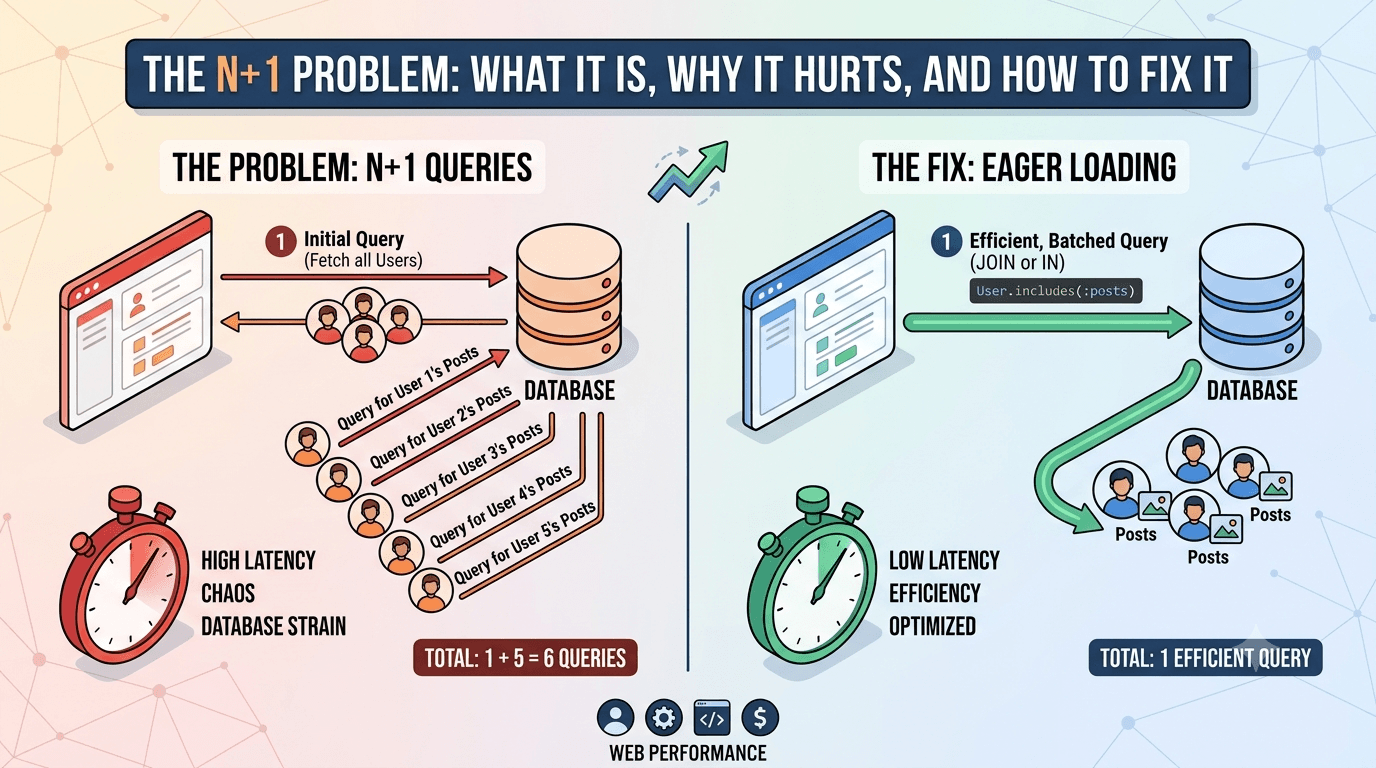
You load a list of blog posts from your database. Simple enough — one query. Then you render each post with its author's name. Suddenly your application fires 51 queries to display 50 posts. Your page is slow, your database is sweating, and you have no idea why.
That is the N+1 problem.
What exactly is N+1?
The name describes the query pattern. You run 1 query to fetch a list of N items, then N additional queries to fetch related data for each item — one per row.
Total queries: N + 1. For 50 posts, that is 51 queries. For 500 posts, it is 501.
The dangerous part is how invisible it is. Your code looks clean. Each individual query is fast. But the cumulative cost of firing hundreds of round-trips to the database adds up fast.
A concrete example
Imagine you have two tables: users and orders. You want to list all orders with the name of the user who placed each one.
The naive approach:
// 1 query to fetch all orders
const orders = await db.query("SELECT * FROM orders");

// N queries — one per order — to fetch the user
for (const order of orders) {
  const user = await db.query(
    "SELECT * FROM users WHERE id = $1",
    [order.userId]
  );
  order.userName = user.name;
}
If you have 200 orders, this runs 201 queries. Your application is technically correct, but it will crawl under any real load.
ORMs make this even easier to miss. The same problem in an ORM like Prisma or TypeORM looks deceptively clean:
// Looks innocent — but fires N+1 queries
const orders = await prisma.order.findMany();

for (const order of orders) {
  const user = await prisma.user.findUnique({
    where: { id: order.userId },
  });
  console.log(user.name);
}
No raw SQL in sight. Still the same problem.
Why it matters so much
A single extra query is nothing. But N+1 queries compound in ways that kill real applications:
- Latency multiplies — each database round-trip adds network overhead, even on localhost
- Database connection pool exhausts — under concurrent users, you flood the pool
- Caching does not help — the pattern bypasses any row-level cache you might have
- It scales inversely — the more data you have, the worse it gets
A feature that works fine in development with 10 rows collapses in production with 10,000.
How to fix it
Solution 1: JOIN — fetch everything in one query
The most direct fix. Use a SQL JOIN to pull related data in a single round-trip.
SELECT orders.id, orders.total, users.name AS user_name
FROM orders
JOIN users ON users.id = orders.user_id;
In an ORM, this is eager loading — telling the ORM to include the relation upfront:
// Prisma: include tells it to JOIN users in the same query
const orders = await prisma.order.findMany({
  include: { user: true },
});

// Now order.user.name is already loaded — zero extra queries
for (const order of orders) {
  console.log(order.user.name);
}
One query. Done. This is the right default for simple parent-child relations.
Solution 2: Batch loading with IN
When a JOIN is not practical — for example in a GraphQL resolver or a deeply nested structure — fetch all the IDs you need first, then load them in one batched query using IN.
// Step 1: Fetch all orders
const orders = await db.query("SELECT * FROM orders");

// Step 2: Collect all unique user IDs
const userIds = [...new Set(orders.map(o => o.userId))];

// Step 3: One query to fetch all needed users
const users = await db.query(
  "SELECT * FROM users WHERE id = ANY($1)",
  [userIds]
);

// Step 4: Build a lookup map
const userMap = Object.fromEntries(users.map(u => [u.id, u]));

// Step 5: Attach — no more queries
for (const order of orders) {
  order.userName = userMap[order.userId].name;
}
2 queries total, regardless of how many orders exist. This pattern is the foundation of Facebook's DataLoader library, which automates it for GraphQL.
Solution 3: DataLoader (for GraphQL APIs)
DataLoader batches and caches all requests made within a single event loop tick. Instead of resolving each field independently, it collects the IDs and fires one query.
import DataLoader from "dataloader";

const userLoader = new DataLoader(async (userIds) => {
  const users = await db.query(
    "SELECT * FROM users WHERE id = ANY($1)",
    [userIds]
  );
  // Must return results in the same order as the input IDs
  return userIds.map(id => users.find(u => u.id === id));
});

// Now in each resolver — DataLoader batches these automatically
const user = await userLoader.load(order.userId);
Each load() call looks like a single fetch, but DataLoader batches them all into one query per tick. It also caches within the request so the same user is never fetched twice.
How to detect N+1 in your app
You cannot fix what you cannot see. Here is how to catch it:
- Log queries in development — Prisma has
log: ["query"], Hibernate hasshow_sql, Sequelize haslogging: console.log. Turn these on and watch what fires when you load a page. - Count queries in tests — assert that a given operation fires at most N queries. If that number grows when you add rows, you have N+1.
- APM tools — Datadog, New Relic, and similar tools show query counts per request. A spike in queries-per-request is a classic N+1 signal.
- Bullet Gem (Rails) / similar — frameworks have dedicated N+1 detection libraries that alert you at runtime.
A good rule of thumb: any page that shows a list of items with related data should fire a fixed, small number of queries — not a number that scales with the list size.
Choosing the right fix
- Simple relation on one model → use
include/ eager loading (JOIN) - Multiple layers deep, or conditional → batch with
INor DataLoader - GraphQL API → DataLoader is the standard answer
- Reporting or analytics queries → write the SQL manually with explicit JOINs
No single solution fits every case. The key is recognizing the pattern and reaching for the appropriate tool.
What to remember
The N+1 problem is not a language or framework bug. It is a mismatch between how application code naturally iterates and how databases are designed to be queried. Databases excel at set-based operations — fetching many rows at once. Application loops naturally think row by row.
The fix is always the same idea: fetch what you need in as few round-trips as possible, using set-based queries. Whether you do that with a JOIN, a batched IN, or DataLoader is just an implementation detail.
Once you see the pattern, you will spot it everywhere. And once you fix it, you will wonder how your application survived without the change.
Tagged
Comments
Join the discussion. Your email is never shown publicly.